
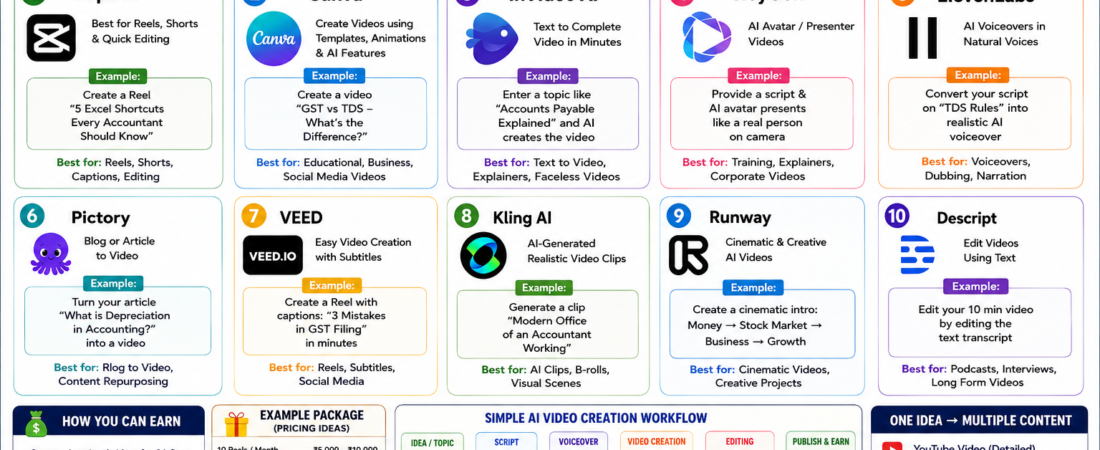
10 AI Video Tools You Can Use to Create Videos & Earn Money

You don’t need a professional camera, expensive software, or advanced video-editing skills to start creating videos today.
With AI video tools, you can turn a simple idea or text into a professional-looking video in minutes.
For example, instead of spending 2–3 hours creating a finance Reel manually, you can use AI to create the script, voiceover, visuals, captions and editing much faster.
1️⃣ CapCut – Best for Reels & Shorts
CapCut is useful for editing Instagram Reels, YouTube Shorts and other short-form videos.
Example:
Suppose you want to create:
“5 Excel Shortcuts Every Accountant Should Know”
You can:
- Record your Excel screen
- Add AI-generated captions
- Add background music
- Add text animations
- Remove unnecessary portions
- Export as a Reel/Short
💡 Earning idea:
Offer short-form video editing to accountants, coaches, consultants and small businesses.
2️⃣ Canva – Create Videos Without Advanced Editing
Canva is useful for creating educational and business videos using templates, animations and AI features.
Example:
Create a video:
“GST vs TDS – What’s the Difference?”
Slide 1: GST
Slide 2: TDS
Slide 3: Key differences
Slide 4: Real-life example
Slide 5: Call to action
You can turn these slides into a complete short video.
💡 Earning idea:
Create 10–20 educational videos every month for CA firms, consultants or finance creators.
3️⃣ InVideo AI – Text to Video
InVideo AI can help convert a written idea into a video.
Example:
Enter:
“Create a 45-second video explaining what Accounts Payable means, with a simple business example.”
AI can help create the video structure, visuals, voiceover and captions.
This is particularly useful when you don’t want to appear on camera.
4️⃣ HeyGen – AI Avatar Videos
Want to create videos without recording yourself?
AI avatar tools can create a presenter-style video.
Example:
You provide a script:
“Today we’re going to understand what a Bank Reconciliation Statement is and why businesses use it.”
An AI presenter can deliver the script.
💡 Best for:
- Training videos
- Business explainers
- Educational content
- Product demonstrations
5️⃣ ElevenLabs – AI Voiceovers
A good voice can make an educational video much more engaging.
Example:
You create a script about:
“3 Mistakes Businesses Make While Filing GST.”
Instead of recording your own voice, you can generate an AI voiceover and combine it with visuals.
💡 Earning idea:
Offer voiceover + video packages to YouTube creators and businesses.
6️⃣ Pictory – Convert Written Content Into Videos
If you already write blogs or articles, you can repurpose them into videos.
Example:
You have an article:
“What is Depreciation in Accounting?”
You can convert the article into a short educational video.
One article can potentially become:
1 Blog + 1 YouTube video + 3 Shorts + 1 LinkedIn post
🔥 This is called content repurposing.
7️⃣ VEED – Social Media Video Creation
VEED is useful for creating and editing social media videos.
Example:
Create a Reel:
Hook:
“Still using 10 steps to clean your Excel data?”
Then show:
TRIM → CLEAN → SUBSTITUTE
Finish with:
“Follow for more Excel shortcuts.”
Captions and simple animations can make the video more engaging.
8️⃣ Kling AI – AI-Generated Video Clips
Kling AI can be useful when you want to generate visual scenes from text or images.
Example:
You want an opening scene for a finance video:
“A modern business office with an accountant analyzing financial reports on multiple screens.”
You can use an AI-generated clip as the introduction.
9️⃣ Runway – Creative & Cinematic Videos
Runway is useful for more creative AI-generated video content.
Example:
For a finance YouTube channel, you could create an opening scene showing:
Money → Stock Market → Business → Accounting → Financial Growth
This can give your videos a more cinematic feel.
🔟 Descript – Edit Videos Using Text
Descript makes video editing more similar to editing a document.
Example:
You record a 10-minute tutorial.
After transcription, you can edit the text to remove unwanted sections, which can help simplify the corresponding video.
Great for:
- YouTube
- Podcasts
- Tutorials
- Interviews
💰 How Can You Actually Earn With These Tools?
The biggest opportunity isn’t simply “making AI videos.”
It’s solving a business problem.
For example:
Client: CA Firm
They want more social media content.
You offer:
12 Reels + captions + thumbnails = ₹10,000/month
You use:
ChatGPT → script
↓
Canva/InVideo → video
↓
ElevenLabs → voice
↓
CapCut → final editing
You don’t necessarily need to spend hours manually editing every video.
📊 One Idea → Multiple Pieces of Content
Suppose your topic is:
“What is TDS?”
From one topic, you can create:
🎬 YouTube video: What is TDS?
📱 Reel: TDS explained in 30 seconds
📊 Carousel: 5 important TDS sections
📝 LinkedIn post: Common TDS mistakes
🎙️ Short: TDS with a real-life example
This is where AI becomes powerful.
🎯 Best AI Video Stack for Beginners
If you’re starting from zero, don’t subscribe to 10 different tools immediately.
Start with:
ChatGPT → Ideas + Scripts
Canva → Visuals
CapCut → Editing + Captions
ElevenLabs → Voiceover
Once you start getting clients, add more specialized tools.
💡 Real-Life Example: Create a Finance Reel
Topic:
“Fixed vs Floating Interest Rate”
Step 1 – Hook
“Taking a loan? Don’t ignore this difference!”
Step 2 – Explain
Fixed Rate:
Your interest rate generally remains fixed according to the loan terms.
Floating Rate:
The interest rate can change based on the applicable benchmark and loan terms.
Step 3 – Example
Suppose you take a loan of ₹10 lakh.
With a fixed-rate loan, your applicable interest rate remains fixed according to the agreed terms.
With a floating-rate loan, your rate may increase or decrease when the applicable benchmark changes.
Step 4 – Closing
“Before choosing a loan, compare the interest rate, reset terms, fees and overall cost—not just the starting rate.”
Now turn this script into a 30–45 second Reel using AI.
🚀 Final Takeaway
AI video tools are not just for influencers.
They can be used by:
✅ Accountants
✅ CA firms
✅ Consultants
✅ Coaches
✅ E-commerce businesses
✅ Real estate businesses
✅ Educators
✅ Freelancers
✅ Small businesses
The real opportunity is to combine AI + your existing professional knowledge.
If you already understand finance, accounting, Excel or business, you don’t need to compete with thousands of generic video editors.
Use your knowledge as the advantage and AI as the production tool.
🔥
“Don’t just use AI to create videos. Use AI to turn your knowledge into content—and your content into income.”